Two Hours Into a Road Trip, You’ll Be Glad You Did This
Long car rides with kids require one of two things: exceptional patience or a screen. If you’re two hours into a road trip answering “are we there yet?” for the 47th time, you know which one won.
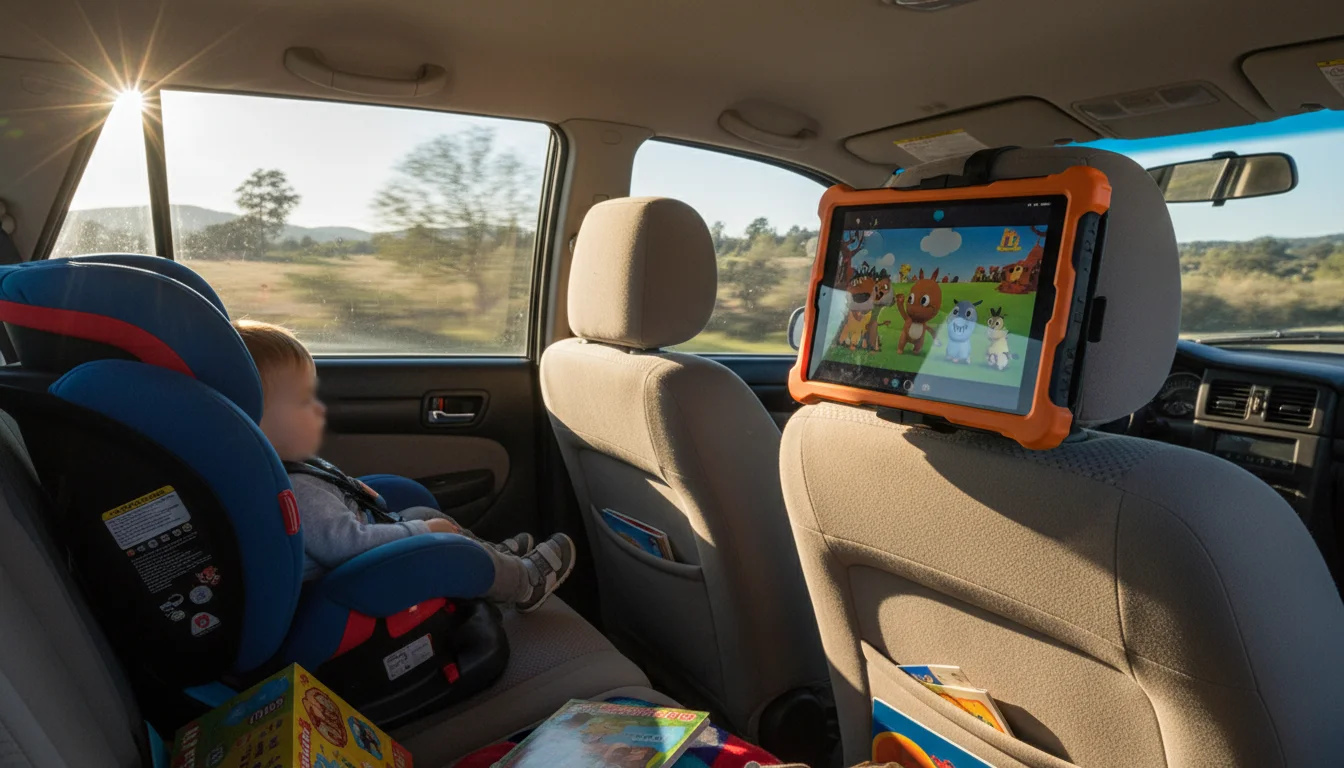
Mount the old iPad on the back of a headrest, load it with movies and games, and hand each kid a pair of headphones. Done.
Setting It Up
Download Everything Before You Leave
Cell data on the highway is unreliable, and streaming burns through data plans. Download content while on Wi-Fi at home:
 Netflix: Download → select episodes (available offline for up to 30 days)
- Disney+: Download → select movies or shows
- Amazon Prime Video: Download → choose quality (lower quality = more episodes fit)
- YouTube Premium: Download videos for offline viewing ($14/month includes YouTube Music)
- Apple TV+: Download → select shows and movies
How much storage you need: A standard-quality movie is about 1-2 GB. A season of a kids’ show is 2-4 GB. A 32 GB iPad with 10 GB free can hold 3-4 movies or a couple seasons of shows – enough for most road trips.
Headphones Are Non-Negotiable
Unless you want to listen to Bluey at full volume for 3 hours, get headphones for each kid:
- Wired headphones ($10-15) – simpler, no charging, plug-and-play. Get ones with a volume limiter (85 dB max) for kids.
- Bluetooth headphones ($20-30) – no wires to tangle, but need charging.
 JBL JR310BT and
  Puro Sound Labs are popular volume-limited options for kids.
Headphone splitter ($5): If two kids are sharing one iPad, a headphone splitter lets both plug in. Less fighting over what to watch, though.
The Mount
A headrest mount keeps the iPad secure and at the right angle for the back seat:
 LISEN Headrest Mount (~$15) – adjustable, fits most tablets, installs in 2 minutes
 Macally Car Headrest Mount (~$18) – similar design, slightly sturdier
- TFY Headrest Strap (~$10) – simpler strap-based mount, works but less adjustable
Installation: hook it over the headrest posts, tighten, slide in the iPad. Most mounts fit iPads from the mini to the 10.2″ model.
Power
A long road trip can drain an old iPad’s battery. Keep it charged:
- Car USB charger ($10) – plugs into the 12V/cigarette lighter socket, provides USB power
- Long USB cable (6-10 ft / 2-3 m, $10) – reaches from the front power outlet to the back seat
- If your car has rear USB ports – just plug in directly
What to Load
For Toddlers (2-4)
- Downloaded episodes of their favorite show (Bluey, Daniel Tiger, Cocomelon)
- PBS Kids app (downloaded episodes available)
- Simple touch games (Sago Mini apps, Toca Boca)
- Use Guided Access to lock to one app (triple-click the Home button)
For Kids (5-8)
- Movies (download a new one they haven’t seen – road trip treat)
- Minecraft ($7) – works offline, infinite replayability
- Drawing apps (
 Sketchbook, Drawing Desk)
 - Audiobooks via Libby (download from the library before leaving)
For Tweens (9-12)
- Longer movies or a TV series
- Games (see our retro gaming guide – pair with a controller)
- Music with their own playlist
- Ebooks (Kindle, Apple Books)
For Everyone
- Download a playlist on Spotify or Apple Music for the car speakers (AUX or Bluetooth) – our tablet music player guide has the full compatibility breakdown
- Podcasts downloaded for offline listening
- Navigation apps (Google Maps, Waze) – use the iPad as a second nav screen
Tips from Experience
Start the iPad after you leave the neighborhood. If the screen comes on the moment they buckle in, they expect it for every 5-minute drive to the grocery store. Save it for highway driving.
Bring a microfiber cloth. Kids + screens + snacks = smudgy mess. A quick wipe at rest stops keeps the screen readable.
Charge overnight before the trip. Start at 100% even if you have a car charger. Backup power for when the car charger is buried under luggage.
Download a new movie they haven’t seen. The novelty buys you an extra hour of quiet compared to a movie they’ve seen twelve times.
Set a timer. Even on long road trips, some screen-free time is healthy. Alternate between iPad time and audiobooks, car games, or looking out the window.
What About CarPlay/Android Auto?
If your car supports CarPlay or Android Auto, your phone already handles navigation and music on the car’s screen. The old iPad in the back seat is specifically for passenger entertainment – it’s not competing with your car system, it’s complementing it. And if you were hoping to use that old iPad as a CarPlay screen, the short answer is no, but it’s still useful up front for navigation and music.
If your car doesn’t have a built-in infotainment system, you can turn an old Android tablet into an Android Auto display mounted on the dash for navigation and music up front.
You drive with your nav on the car screen. The kids watch movies on the iPad behind you. Everyone’s happy.
Quick Checklist
- Download movies, shows, and games at home on Wi-Fi
- Get a headrest mount ($10-18)
- Get kid headphones with volume limiting ($10-15 each)
- Get a car charger + long USB cable ($15-20)
- Set up Guided Access if kids are young
- Mount it, plug it in, hand over the headphones
- Drive in peace
Total cost: $35-55 for accessories. Your old iPad just bought you 4 hours of quiet on the drive to grandma’s house. Worth every penny.
Car entertainment is just one option. Browse our complete list of old iPad ideas for more ways to put that tablet back to work.